WranglerCI
What is Wrangler CI?
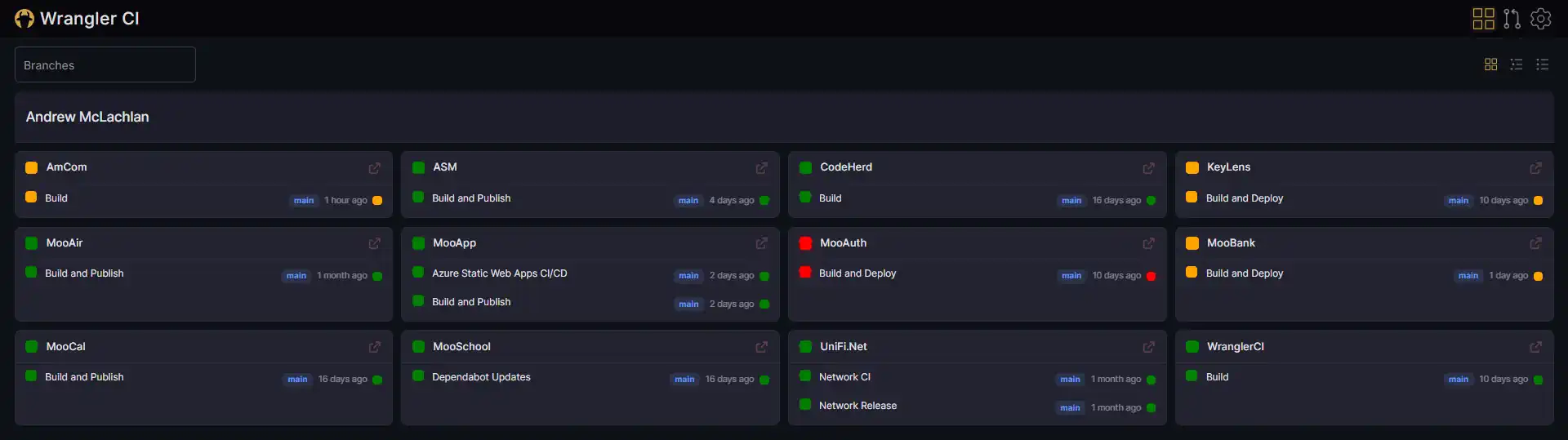
Wrangler CI is a web dashboard that pulls the status of GitHub Actions workflows and open pull requests into a single view. Rather than clicking through repository after repository on github.com, I get one screen with Red/Amber/Green indicators for each workflow, and a rolled-up list of the PRs waiting on me. It is a .NET backend with a React front end, and it is hosted at wranglerci.io.
Why I built it
All my side projects, my employer's code, and big chunk of rest of the world's lives on GitHub. For many, GitHub also serves as their CI/CD system, supplanting some of other, dedicated tooling out there like Jenkins, TeamCity and Octopus Deploy. The problem is that GitHub Actions and Workflows have no-where near the sophistication of those dedicated tools.
I've always valued "glanceability", being to quickly see when a particular workflow needs my attention, and there's just no way to get that in GitHub.
GitHub's own Actions view is per-repository. If yout want to see the state of ten repos, that is ten tabs and a lot of scrolling.
Monolithic repository support is terrible. If your workflow happens to start with a letter lower down the alphabet, you'll be clicking "load more" a lot to get to it...
...only to find a list of feature branch and Dependabot builds you need to filter out to see the state of the last build on main.
When a workflow fails overnight, You want to see it without hunting for it.
Wrangler CI is my attempt to flatten all of that into a single screen.
Bot-Driven Pull Requests
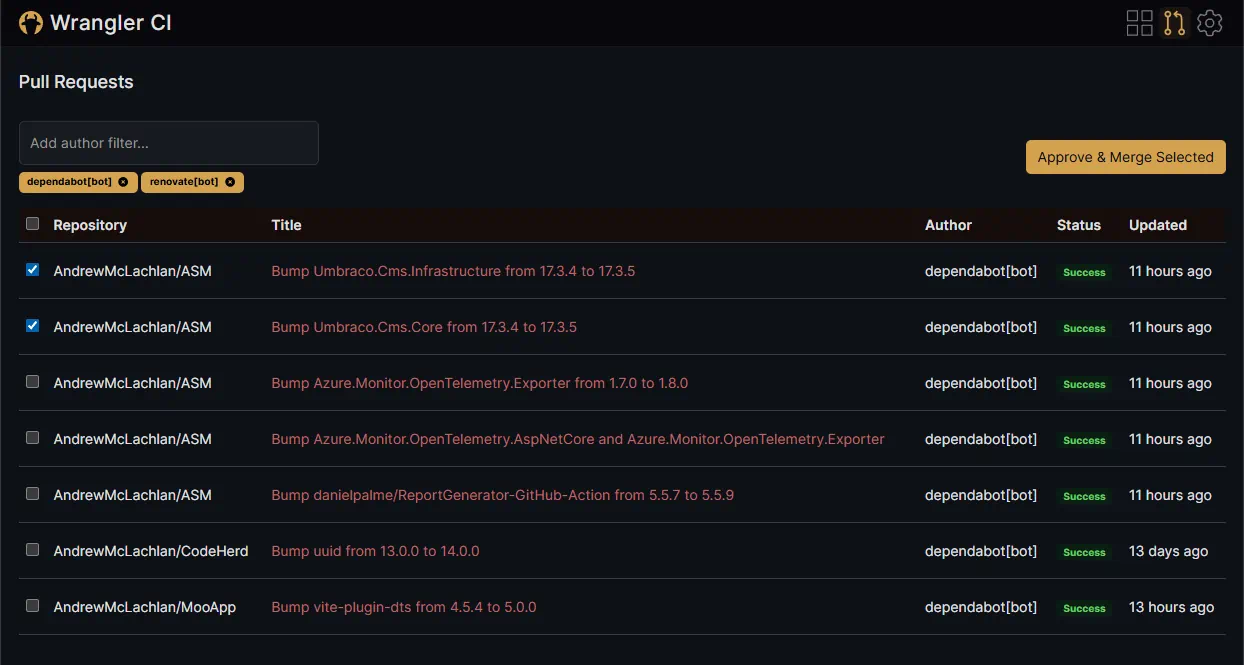
Keeping your software's package dependencies up to date is important cyber security concern, but one that grows ever more burdensome as your estate expands. Update bots like Dependabot and Renovate can help you keep on top of these, but will still produce many PR's for a human to review. Techniques exist like update bundling, AI review if you trust it, or as I do for some of my personal projects "just ship it", with auto-approve and auto-merge. For those still labouring through a dozen PRs a day, I created a tick-n-flick page.
How it works
Under the hood it is a fairly conventional split between a backend API and a single page app, with a few deliberate choices:
.NET 10 minimal API on the server, using Octokit to call both the GitHub REST and GraphQL APIs. Handlers are small static classes, and shared concerns like caching and retry live on a GitHub service base class.
React 19 with TanStack Router and TanStack Query on the front end. The router is file-based, and the API client is generated from the backend's OpenAPI spec so the types on both sides never drift apart.
GitHub OAuth for login. Tokens are held server-side only, so nothing sensitive ever touches the browser.
Redis to cache GitHub responses. That keeps the UI snappy and keeps me well inside GitHub's API rate limits.
RAG aggregation rolls the recent runs of each workflow into one of a handful of states: success, running, waiting, action required, or failure. That is what drives the colour of every card on the dashboard.
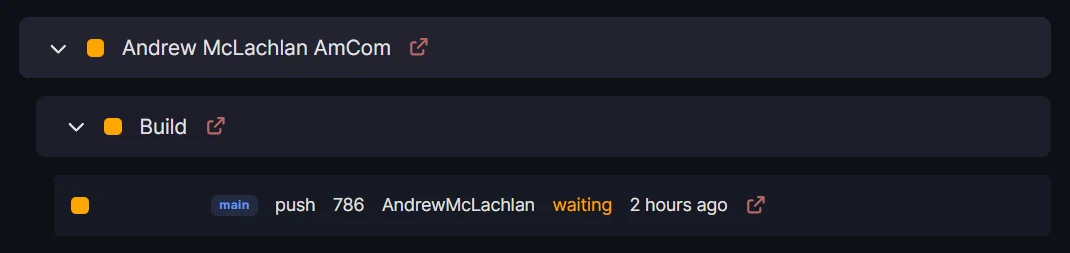
Three different views depending on you preferences
What it gives you day to day
Workflow monitoring - every tracked workflow in every tracked repository, coloured by status.
Layout choices - cards when I want the overview, nested or flat lists when I want to scan quickly.
Pull requests in context - open PRs with their check statuses, plus approve and merge without leaving the page.
Scope control - pick which repositories and which workflows to include, so retired projects do not clutter the view.
Wrangler CI is open source and under active development. Source code and releases are on GitHub.